banking-cybersecurity-demo — live simulation

All Things You Should Know About Testing and DevOps
Saturday, 17 October 2026
Monday, 12 October 2026
🚨 Blocking Prompt Injection & Indirect Prompt Injection - LLM SECURITY DEMO
🚨 LLM SECURITY DEMO – Blocking Prompt Injection & Indirect Prompt Injection
YouTube Playlist:
▶ PLAYLIST ▶🕵️ Security Lab Demo | LLM Threat Research Series
Prompt injection is the #1 most exploited LLM security issue, and its sneakiest variant — indirect prompt injection — is especially dangerous for AI agents with internet access. 🌐
I ran a controlled experiment to show exactly how this attack works — and how modern models respond. 👇
⚠️ Why Indirect Prompt Injection Is Dangerous
🔴 Everyday Users → manipulated answers, unauthorized actions, or disclosure of private data via agents with tool access
🟠 DevOps & Developers → coding agents steered by untrusted repo files, dependencies, or comments → unwanted code/config changes, hidden review edits, risky CI/CD actions
🟡 SecOps → triggers hidden in routine external content; the agent appears to operate normally, complicating investigations
🟣 Everyone → the attack hides inside ordinary content, making it nearly invisible 👻
🛡️ Defense Playbook for Teams
✅ Treat all fetched content (web pages, files, emails, repos) as data — never instructions
✅ Apply least-privilege permissions to agents and their tools
✅ Restrict outbound access (block data exfiltration routes)
✅ Require human approval for sensitive actions
✅ Log & monitor agent inputs and tool calls — full visibility
🏁 Bottom Line
Prompt injection remains the most exploited class of LLM security issues, and indirect prompt injection is the sharpest edge for AI agents with internet access. Models are improving at resistance — but layered defenses, not model behavior alone, keep agents safe. 🔒
💬 Has your organization tested its AI agents against injection?
⚠️ Disclaimer: Controlled research demo using a harmless signal string. No real systems were harmed.
Follow --"Vadivel Sekar" --Platforms All --Notifications On
FOLLOW THE COMPLETE ENGINEERING JOURNEY
🚀 Build. Break. Secure. Repeat.
Hands-on projects across full-stack development, automated testing, CI/CD, DevOps, quality engineering and security — delivered as complete, working builds.
// 🔔 new projects every week — hit subscribe & ring the bell
Friday, 9 October 2026
🔍 DEVELOPMENT OF MICROSOFT OFFICE SECURITY SCAN TOOL
SCAN STATUS : DEMONSTRATION COMPLETE
CLASSIFICATION : SECURITY ASSESSMENT
TARGET : MICROSOFT OFFICE
🛡️ DEVELOPMENT OF MICROSOFT OFFICE SECURITY SCAN TOOL
Endpoint defense, validated by evidence — macro policy · ASR rules · Kill-bits · Defender posture.
#EndpointSecurity
#MicrosoftOffice
#ASR
#MacroPolicy
#Kill-bits
#Defender
▶ WATCH THE FULL DEMONSTRATION ON YOUTUBE
 🎬 PLAYLIST
▶
📺 YOUTUBE PLAYLIST — WATCH THE FULL SERIES
Microsoft Office Security Scan Tool — Complete Build & Demo
Click anywhere on this card to open the playlist in a new tab ↗
🎬 PLAYLIST
▶
📺 YOUTUBE PLAYLIST — WATCH THE FULL SERIES
Microsoft Office Security Scan Tool — Complete Build & Demo
Click anywhere on this card to open the playlist in a new tab ↗
01 🎯 Introduction // mission briefing
Microsoft Office security is a cornerstone of endpoint protection. Misconfigured macro policies, missing Attack Surface Reduction (ASR) rules, and susceptible legacy Kill-bits controls can silently widen an organization's attack surface.
This demonstration presents a purpose-built Microsoft Office security scanning module engineered to:
🔎 Identify weaknesses
🧪 Validate mitigations
📊 Generate detailed reports
🧭 Guide remediation
02 📊 Key Security Findings // scan report
The report flagged the areas below for attention — ranked by severity:
🔴 CRITICAL
Kill-Bit Mitigation
The controlled removal test detected a susceptible legacy control — proof the scanner catches real regressions.
⚠ HIGH
Attack Surface Reduction (ASR)
Important Office-related ASR rules are missing from the configuration.
⚠ REVIEW
Macro Security Policy
Explicit macro security settings require review and hardening.
🛡️ ACTIVE
Microsoft Defender
Real-time protection is active — signature age reported as 0.5 days in the demonstration.
🧠 The takeaway: security monitoring must inspect individual controls — never rely on a single "antivirus OK" or "updates current" status.
03 🧪 Technical Evidence & Reporting // audit-ready output
The scanner generates structured, audit-ready reports containing findings, severity ratings, technical evidence, and remediation guidance. Captured evidence includes:
$ office-security-scan --export evidence.json
[✔] Office Click-to-Run configuration & binary versions
[✔] Kill-bit status
[✔] Macro security policies
[✔] Microsoft Defender & ASR configuration
[✔] Document scanning results
[!] Susceptible control detected — mitigation removed
→ Evidence written to report · severity + remediation attached
This evidence helps security teams understand the detected issue, validate mitigation status, and prioritize corrective action.
04 🚀 Security Best Practices // hardening checklist
Organizations and individual Microsoft Office users should lock in these controls:
✔ Keep Microsoft Office updatedand use the intended servicing channel.
✔ Apply appropriate macro security policies and restrict untrusted content.
✔ Enable and validate relevant ASR rules.
✔ Maintain Microsoft Defender real-time protection with current security intelligence.
✔ Run regular security assessments — especially after configuration changes.
✔ Review scan findings and complete remediation before marking a system cleared.
05 🔐 Conclusion // evidence over assumption
🛡️
Repeatable security testing works. This demonstration detected a security issue during a controlled mitigation-removal test — then validated the restored mitigation — proving how Microsoft Office security controls can be assessed through evidence-based testing.
⚡ Remember: keeping software updated is essential — but it never replaces security configuration reviews, security scanning, and mitigation validation. Regular assessments help IT, DevOps & SecOps teams detect weaknesses earlier and strengthen their Microsoft Office security posture.
Follow --"Vadivel Sekar" --Platforms All --Notifications On
FOLLOW THE COMPLETE ENGINEERING JOURNEY
🚀 Build. Break. Secure. Repeat.
Hands-on projects across full-stack development, automated testing, CI/CD, DevOps, quality engineering and security — delivered as complete, working builds.
// 🔔 new projects every week — hit subscribe & ring the bell
Monday, 5 October 2026
🔒 Azure Linux Under the Microscope: What a Deep Security Scan Revealed
🔒 Azure Linux Under the Microscope
What a Deep Security Scan Really Revealed
▶️ Watch the Demo
📺 Full Playlist
Playlist link: Open on YouTube →
🛡️ Security Begins with Visibility
Cloud security is not simply about identifying vulnerabilities — it is about understanding whether those vulnerabilities are present, linked, reachable, executable, and potentially exploitable.
In this demonstration, a dedicated security scanning tool for Azure Linux OS was used to perform a series of security tests and generate a detailed assessment report.
🚀 Scan → Analyze → Validate → Remediate
The security scan was initiated against the Azure Linux environment and completed successfully, producing a comprehensive “Security Test Report – Azure Linux Assessment.”
The report provided:
- 🟢 Security test results
- 🟠 Identified findings
- 🔵 Binary and source-level analysis
- 🟣 Execution-path validation
- 🔍 Supporting evidence
- 📋 Demonstration and test details
🧠 Presence Does Not Mean Reachability
One of the most important lessons from this assessment is:
A security-sensitive component being present in a binary does not automatically mean that it is reachable or exploitable.
The assessment compared binary-level linkage with source-level execution paths:
Linked → Reachable → Executed → Potentially Exploitable
This approach helps security teams prioritize genuine risks while reducing noise from findings that exist in an artifact but cannot actually be reached during execution.
🧩 Components Under Assessment
The security assessment examined multiple areas, including:
- 🔹 Transport and authorization components
- 🔹 Server and client functionality
- 🔹 Telemetry SDK / exporter
- 🔹 URL resolution
- 🔹 HTML templating
- 🔹 TLS and HTTP functionality
- 🔹 XML and ASN.1 decoding
- 🔹 Networking and IDN handling
- 🔹 Expression-evaluator components
- 🔹 Cloud SDKs and associated tooling
📑 Findings & Evidence
This evidence-driven approach makes the report useful not only for security engineers, but also for DevOps, SecOps, engineering, and technical leadership teams.
🚨 Why Continuous Security Scanning Matters
Security weaknesses can exist across operating systems, applications, libraries, dependencies, and cloud tooling.
Regular scanning helps organizations identify and assess these risks before they become security incidents.
🎯 Recommended Security Practices
- 🟢 Perform regular security assessments
- 🟢 Validate findings instead of relying solely on static detection
- 🟢 Analyze actual execution paths and reachability
- 🟢 Keep operating systems and dependencies updated
- 🟢 Prioritize exploitable and reachable vulnerabilities
- 🟢 Continuously monitor production environments
- 🟢 Integrate security validation into DevSecOps pipelines
🏁 Conclusion
This demonstration shows how a purpose-built security scanning solution can provide deeper insight into the security posture of an Azure Linux environment.
🔐 Find It. Validate It. Understand It. Fix It.
Effective security is not just about generating a list of vulnerabilities. It is about understanding the real attack surface, validating technical findings, collecting evidence, and taking timely remediation actions.
For DevOps and SecOps teams, combining automated scanning, binary analysis, source-level reachability analysis, and continuous monitoring can strengthen security posture and reduce the risk of potential attacks.
Proactive security today helps prevent costly security incidents tomorrow.
⭐
Follow the Complete Engineering Journey
Subscribe for more security, full-stack development, automated testing, CI/CD, DevOps, quality engineering, and software engineering projects.
Tuesday, 29 September 2026
🚀 SS INDUSTRIAL OPS ANALYTICS — FROM FACTORY DATA TO OPERATIONAL INTELLIGENCE (DATA ANALYTICS ) -CI/CD
🚀 SS Industrial Ops Analytics — CI/CD
From Factory Data to Operational Intelligence — Data Analytics
🚀 SS Industrial Ops Analytics — Playlist
Browse the complete demo series in one embedded playlist — analytics, testing, streaming and CI/CD.
A simple, controlled CI/CD journey from code commit to production:
🔵 Pull Request
🏗️ Build
→
🧪 DEV Test
→
🧪 TEST Test
🟢 Main Branch
🏗️ Build
→
🚀 DEV Deploy
→
🧪 DEV Test
→
✅ DEV Approval
→
🚀 TEST Deploy
→
🧪 TEST Test
→
✅ TEST Approval
→
🚀 PROD Deploy
→
🔍 PROD Validation
🔐 Key idea: Build once, test at every stage, and use approval gates before promoting changes between environments.
✨ From PR to Production — automated, tested, and controlled.
⭐
Follow the Complete Engineering Journey
Subscribe for more full-stack development, automated testing, CI/CD, DevOps, quality engineering, security, and software engineering projects.
🧪 SS INDUSTRIAL OPS ANALYTICS — FROM FACTORY DATA TO OPERATIONAL INTELLIGENCE (DATA ANALYTICS ) -TESTS
🏭 SS Industrial Ops Analytics — Tests
From Factory Data to Operational Intelligence — Data Analytics
🏭 SS Industrial Ops Analytics — Playlist
Browse the complete demo series in one embedded playlist — analytics, testing, streaming and CI/CD.
🧪 Testing Demo: From API Contracts to End-to-End
A complete testing strategy validates the system at multiple levels:
🔵 API Contract Testing
REST endpoints are tested with positive and negative scenarios — JWT errors, invalid pagination, malformed JSON, security payloads, and role-based access.
🟢 Analytics Functional Testing
Mathematical correctness is validated through OEE, MTBF, bottleneck calculations, aggregation consistency, ETL flow, and KPI invariants.
🟠 Playwright End-to-End Testing
Real browser workflows validate:
- 🔁 Duplicate data does not increase counters
- 📦 Batch processing updates production/data counts
- ⚡ Streaming events increase event counters
🔺 One Test Pyramid. Three Levels.
Analytics proves the numbers.
API testing proves the contract.
Playwright proves the complete user journey.
🚀 Together, they provide confidence that the system is correct, reliable, and working end-to-end.
⭐
Follow the Complete Engineering Journey
Subscribe for more full-stack development, automated testing, CI/CD, DevOps, quality engineering, security, and software engineering projects.
🏭 SS Industrial Ops Analytics: From Factory Data to Operational Intelligence
🏭 SS Industrial Ops Analytics
From Factory Data to Operational Intelligence
Industrial Ops Analytics Playlist
Explore the complete demo series — data generation, analytics dashboards, testing workflows and streaming pipelines.
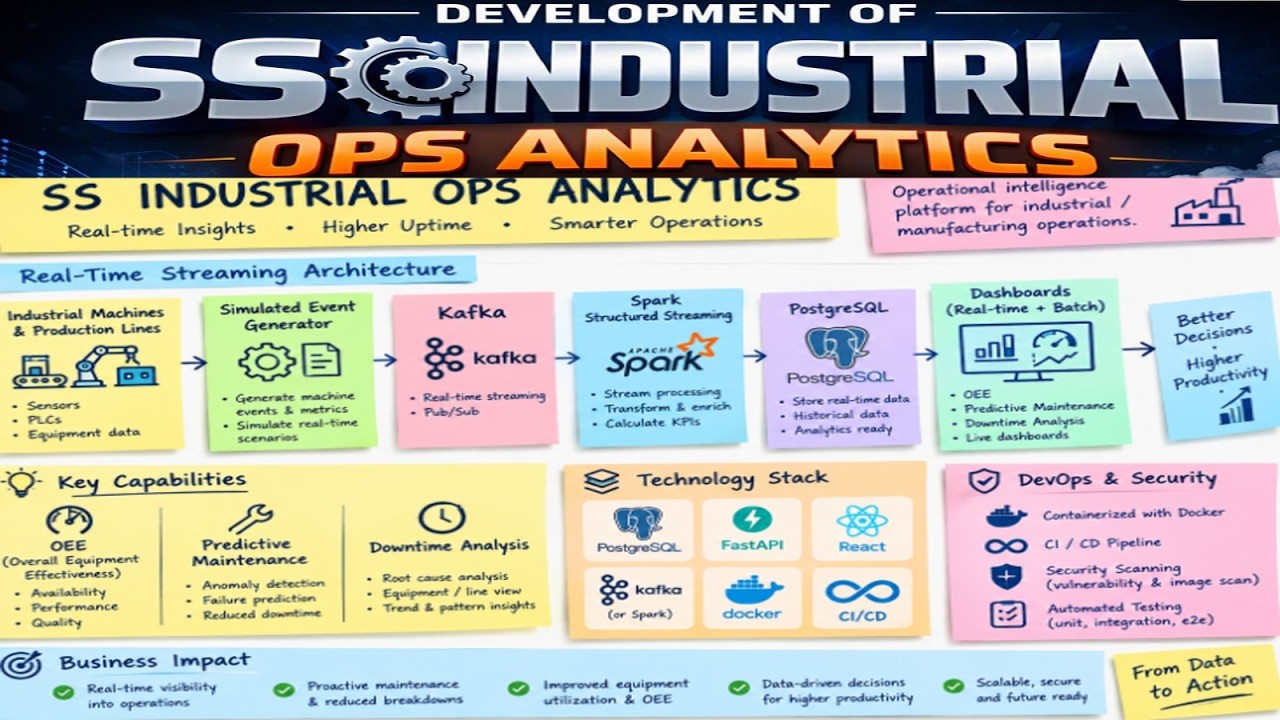
✨ Turning production data into actionable manufacturing insights.
🟢 What the Platform Delivers
- 📊 OEE Intelligence — Availability × Performance × Quality
- ⚙️ Production Analytics — Trends, line comparisons and production counts
- 🤖 Predictive Maintenance — ML-based machine failure-risk prediction
- 🛠️ Downtime Analytics — Pareto analysis and root-cause insights
- 🔬 Quality Analytics — Rejection rates and shift/product comparisons
- 🚧 Bottleneck Detection — Identify production constraints and capacity impact
🔵 From Data to Insights
The platform supports both batch processing and simulated real-time event streaming, with data flowing through:
Synthetic Data → ETL → PostgreSQL → Analytics → ML Predictions
For streaming:
Event Generator → Kafka → Spark Structured Streaming → PostgreSQL → Live Dashboards
🟣 Application Modules
| 📈 Executive Summary | ⚙️ Production |
| 📊 OEE | 💻 Machine Health |
| 🤖 Predictive Maintenance | 🔬 Quality |
| ⏱️ Downtime | 🚧 Bottlenecks |
| ✅ Data Quality | ❤️ System Health |
🟠 Quality Engineering
The demo also showcases analytics unit testing and coverage reporting, followed by upcoming demonstrations of:
- ✅ Data analytics testing
- ✅ Integration testing
- ✅ Contract testing
- ✅ Playwright End-to-End testing
- ✅ Batch & live-streaming validation
- ✅ CI/CD automation and security scanning
🚀 Technology Stack
PostgreSQL Python FastAPI React/TypeScript Kafka Spark scikit-learn Docker CI/CD
🎯 The vision is simple: connect industrial data, analytics and AI to help teams understand performance, downtime, quality, machine health and production bottlenecks in one operational intelligence platform.
This is the beginning of a demo series covering the complete journey — from data generation and analytics to automated testing, streaming and CI/CD.
⭐
Follow the Complete Engineering Journey
Subscribe for more full-stack development, automated testing, CI/CD, DevOps, quality engineering, security, and software engineering projects.
Sunday, 27 September 2026
🔴 HOW TO CONDUCT A SECURITY ASSESSMENT TEST ON LINUX DOCKER ENVIRONMENT?
Security Demonstration
HOW TO CONDUCT A SECURITY ASSESSMENT TEST ON LINUX DOCKER ENVIRONMENT?
Understanding Why Container Runtime Security Matters
Introduction
Containers provide an efficient way to isolate applications, but their isolation depends heavily on the security of the underlying container runtime and host operating system.
Container security is therefore not limited to application images. The runtime, Linux kernel, host configuration, privileges, permissions, and monitoring controls all contribute to the overall security boundary.
▶ SECURITY DEMONSTRATION
CONTAINER → RUNTIME → HOST
🔐 Key Security Principle
A container boundary should be treated as a security
boundary that must be continuously protected, monitored,
patched, and properly configured.
Container → Runtime → Host
The relationship between these three layers is central to understanding container security.
Container
Application workload and isolated process environment.
Runtime
Component responsible for creating and managing containers.
Host
Operating system and infrastructure supporting container workloads.
Why Container Runtime Security Matters
Container security is not limited to application images. A secure environment also depends on several layers of infrastructure security.
- ✓ Container runtime security
- ✓ Linux kernel security
- ✓ Host operating-system configuration
- ✓ Container privileges and capabilities
- ✓ Runtime permissions
- ✓ Security controls and monitoring
01
Container
02
Runtime
03
Kernel
04
Host
Security Impact
If isolation controls are weakened, the impact of a container compromise can potentially extend beyond the individual application workload.
- ! Host operating-system resources
- ! Sensitive host files
- ! Other workloads
- ! Runtime credentials or configuration
- ! Privileged host capabilities
The Security Lesson
⚠ Container Isolation Requires Continuous Protection
Container isolation is not an absolute security boundary. Vulnerabilities or misconfigurations involving container runtimes and privileged components can potentially turn a container compromise into a host compromise.
Security Recommendations
- ✓ Keep Docker and the container runtime updated.
- ✓ Apply security patches promptly.
- ✓ Minimize container privileges.
- ✓ Follow container-hardening best practices.
- ✓ Monitor runtime and host activity for suspicious behaviour.
- ✓ Regularly assess container environments for security weaknesses.
- ✓ Review exposed capabilities and unnecessary permissions.
🛡️ Key Takeaway
A compromised container should not automatically become a compromised host. However, weaknesses in the container runtime, host configuration, or privileged components can make that boundary vulnerable.
Security Engineering Playlist
Explore the complete security engineering series, demonstrations, testing workflows, and related topics.
📡 Follow the Complete Engineering Journey
Subscribe for more security, full-stack development, automated testing, CI/CD, DevOps, quality engineering, and software engineering projects.
$
security.status --container-runtime
✓ Runtime security: MONITORED
✓ Container privileges: MINIMIZED
✓ Security patches: REQUIRED
⚠ Container isolation: SECURITY BOUNDARY
$
stay-curious --stay-skeptical --stay-secure
Subscribe to:
Posts (Atom)